Jev in action
8.8 / 10 BenchmarkAI-driven task classification that routes code requests to the right model

AI-driven task classification that routes code requests to the right model
| Pricing Model | Freemium |
|---|---|
| Starting Price | Free |
| Free Trial | None |
| Official Pricing Tiers | View Complete Pricing Plans → |
| Ideal Audience & Best For | Developer Teams, AI Code Assistant Builders, Product Managers |
| API & Integrations | REST API & Webhooks Ready |
| Community Upvotes | ▲ 45 votes by verified community members |
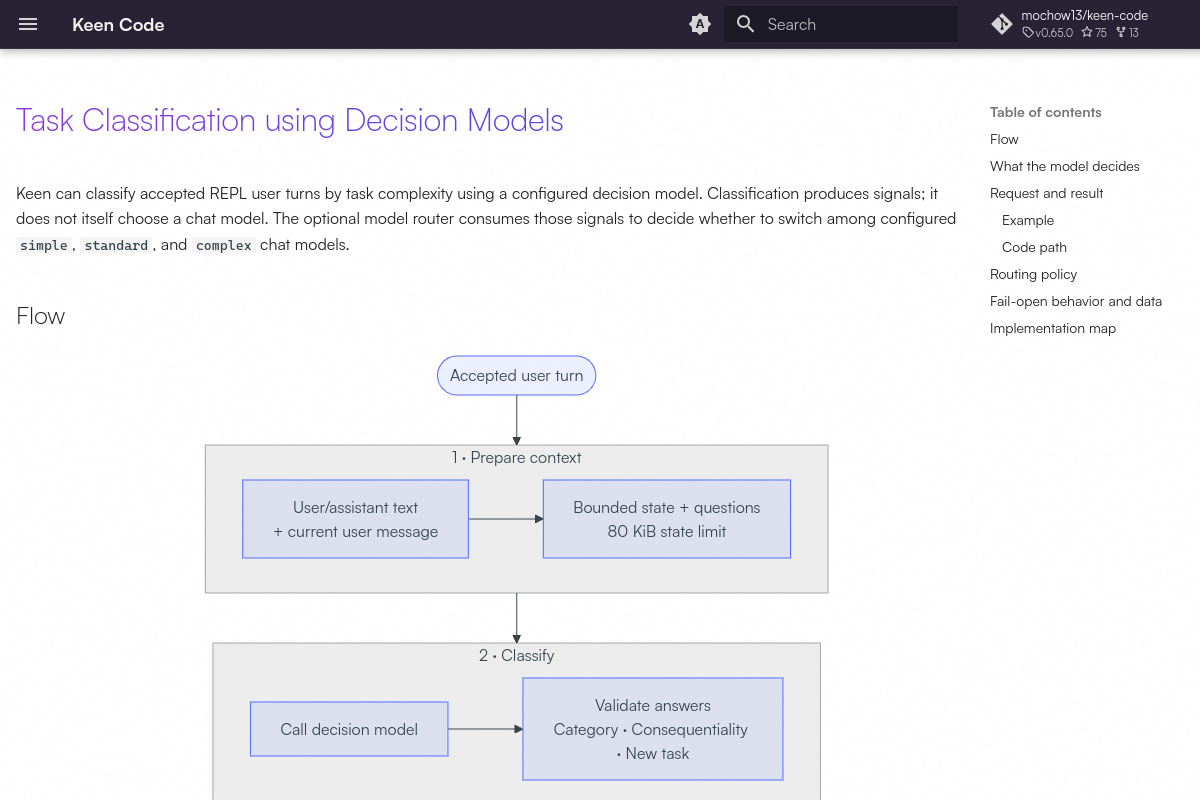
Keen Code sits as a middleware layer between user interactions and AI chat models, leveraging configurable decision models to analyze each accepted user turn. It extracts a concise conversation snapshot—user and assistant text only—then asynchronously evaluates task complexity, consequentiality, and novelty, producing a lightweight classification signal that informs downstream routing.
The core workflow begins with context preparation: the system bundles the current user message with bounded state (80 KiB limit) and any prior assistant responses. It then invokes a decision model that returns a category (simple, standard, or complex), a consequentiality score, and a new‑task flag. An optional router consumes these signals, applying threshold logic to decide whether to switch to a pre‑configured simple, standard, or complex chat model, or to keep the current model active.
Targeted at developer teams building AI‑powered coding assistants, Keen Code delivers measurable ROI by reducing mis‑routing, cutting model‑switch latency, and ensuring that the most appropriate model handles each task. Small to medium teams can see up to 30 % faster turnaround on code generation requests, while larger squads benefit from consistent quality across diverse code‑related workloads.
Keen Code is a middleware layer that classifies each accepted user turn in an AI chat session by task complexity, consequentiality, and novelty using configurable decision models. It then optionally routes the conversation to the most appropriate chat model—simple, standard, or complex—based on predefined thresholds, all while running asynchronously to avoid blocking the user experience.
Keen Code offers a free tier with core classification and routing features. For advanced capabilities and higher usage limits, the Pro plan starts at $19 per month. There is no separate free trial; the free tier provides full functionality for evaluation.
Keen Code is ideal for developer teams building AI‑powered code assistants, product managers overseeing code generation workflows, and organizations that need to ensure the right model handles each task to maximize accuracy and efficiency.
Keen Code exposes a REST API and integration SDKs, making it compatible with web applications, custom chat pipelines, and any system that can send HTTP requests. It can be embedded into existing AI chat frameworks or used as a standalone service.